Computer Awareness Preparation Tips for Competitive Exams Beginners

Computer awareness has become a mandatory section in competitive exams. For beginners, the vast syllabus—ranging from hardware basics to complex networking—can feel overwhelming. Preparing with a reliable computer awareness book and a structured plan ensures you cover every essential topic efficiently.
Check Out: SSC Books
Why Computer Awareness Book Is Important for Competitive Exams
Most major recruitment bodies now include a dedicated section for digital literacy. Whether you are appearing for banking, insurance, or staff selection commissions, having a solid grasp of computer awareness for all competitive exams is non-negotiable.
-
Weightage: In exams like IBPS RRB or RBI Assistant, this section carries significant marks that can drastically improve your overall merit.
-
Time Management: Since these questions are factual, you can solve the entire section in under 10 minutes, leaving more time for Quant or Reasoning.
-
Accuracy: Unlike mathematics, there is no complex calculation involved. If you know the fact, you get the mark instantly.
-
Practical Utility: Beyond the exam, these skills are necessary for day-to-day departmental work in any government office.
Important Topics in Computer Awareness Book
To prepare effectively, you must categorise the syllabus into manageable chunks. Using a comprehensive computer awareness study book will help you cover these core areas:
1. Computer Fundamentals and History
Begin by understanding the evolution of computers. Focus on the five generations of computers, the different types (Micro, Mini, Mainframe, Supercomputers), and the basic functional units like the ALU, CU, and Memory Unit.
2. Hardware and Software
Distinguish between input devices (keyboard, mouse, scanner) and output devices (monitor, printer, plotter). Study the types of software, specifically the difference between System Software (Operating Systems) and Application Software (Word processors, Spreadsheets).
3. Operating Systems
Focus on the functions of an OS. You should be familiar with Windows, Linux, and mobile operating systems like Android or iOS. Understand terms like booting, kernel, and user interface (GUI vs CUI).
4. Memory and Storage Units
This is a high-yield topic for the bank exam computer awareness. Learn about:
-
Primary Memory: RAM (SRAM, DRAM) and ROM (PROM, EPROM, EEPROM).
-
Secondary Memory: Hard Disk Drives (HDD), Solid State Drives (SSD), and optical disks.
-
Units: Bit, Byte, KB, MB, GB, TB, PB. Knowing the conversion logic is vital.
5. Networking and the Internet
Learn the basics of LAN, WAN, and MAN. Understand the OSI model layers, protocols like TCP/IP, HTTP, and FTP, and the role of devices like routers, switches, and modems. Study cybersecurity basics, including viruses, worms, trojans, and firewalls.
Features of Computer Awareness Book
While there are many online resources, a structured computer awareness study book provides a curated path that prevents information overload. Books designed specifically for aspirants, often include:
|
Feature |
Benefit for Aspirants |
|
Topic-wise Theory |
Clear explanations of complex jargon in simple English. |
|
Practice Sets |
Hundreds of MCQs based on the latest exam patterns. |
|
Previous Year Questions |
Insights into the types of questions asked in SSC and Banking. |
|
Shortcut Keys |
Handy tables for MS Office and Windows shortcuts. |
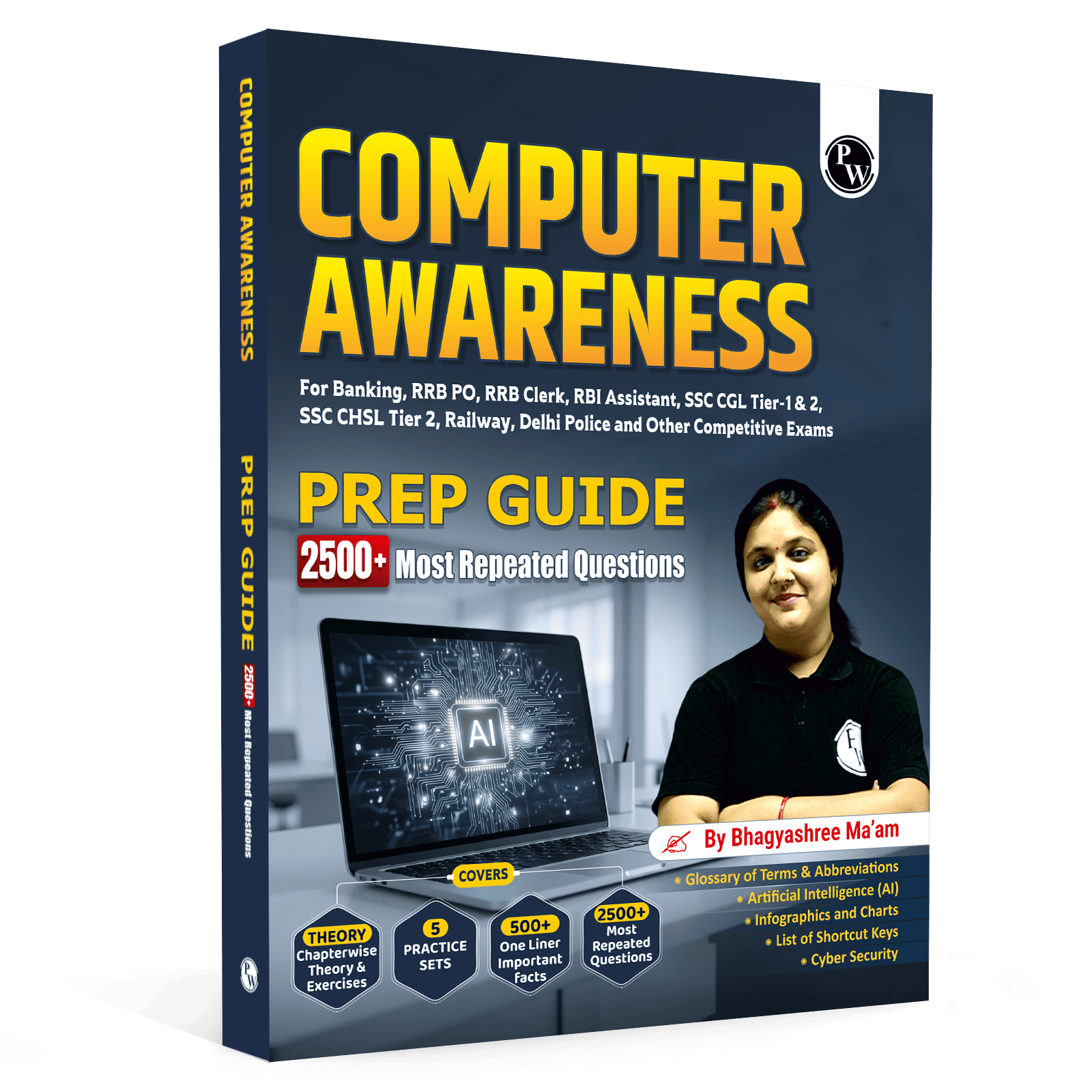
Using the Computer Awareness for Banking, SSC & Other Exams is recommended because it aligns with the evolving difficulty levels of modern exams. It covers everything from basic hardware to advanced MS Office 365 features.
Computer Awareness Preparation Tips for Banking Exams
Banking exams often ask more technical questions compared to other tests. If you are targeting IBPS, SBI, or RBI, follow this specific approach:
-
Focus on MS Office: Questions on MS Word, Excel, and PowerPoint are frequent. Pay close attention to file extensions and ribbon menus.
-
Learn Abbreviations: Memorise common acronyms like BIOS, DBMS, URL, and SQL. These are easy wins in any computer awareness for SSC or banking paper.
-
Database Management: Understand the basics of DBMS, including keys (Primary, Foreign) and the concept of Big Data.
-
Solve Mock Tests: Take section-specific quizzes to improve your speed and identify weak areas in your basic computer knowledge for competitive exams.
Computer Awareness Tips for SSC Exams
The Staff Selection Commission often focuses on the practical application of computers and recent digital initiatives by the government.
-
Shortcut Keys: SSC loves asking about Ctrl, Alt, and Shift combinations. Create a cheat sheet and revise it daily.
-
Internet History: Be aware of the history of the internet in India and global milestones like the creation of the World Wide Web.
-
Hardware Ports: Know the difference between USB, HDMI, and VGA ports.
-
File Formats: Understand different formats for images (JPEG, PNG), audio (MP3, WAV), and video (MP4, AVI).
Easy Ways to Study from Computer Awareness Book
Reading a computer awareness study book from cover to cover can be dry. To make the information stick, try to relate it to your daily life:
-
Look at Your Device: When you read about "Ports," look at the back of your laptop or PC to identify them.
-
Use Shortcuts: Instead of using the mouse, try to perform every action using keyboard shortcuts for a day.
-
Visual Learning: Use diagrams to understand how data flows from the Input unit to the Processor and then to the Output unit.
-
Teach Someone: Explaining a concept like "Cloud Computing" to a friend helps solidify your own understanding of computer awareness for general competitive exams.
Check Out: SSC Previous year Papers
Common Mistakes to Avoid with Computer Awareness Book
Many students fail to score well because of a few common mistakes:
-
Ignoring Updates: Technology changes fast. Ensure your computer awareness study book is the latest edition to cover topics like 5G, AI, and recent cyber threats.
-
Over-reliance on MCQs: Do not just memorise answers. Understand the "why" behind a concept so you can tackle twisted questions.
-
Neglecting Practical Exposure: If you have access to a computer, spend time exploring the Control Panel and Settings to see the theory in action.
Important Shortcut Keys and Abbreviations in Computer Awareness
This section is the "Maths" of computer awareness; it is purely objective and highly rewarding.
Essential Shortcuts:
-
F5: Refresh or Start Slideshow.
-
Ctrl + K: Insert Hyperlink.
-
Ctrl + Esc: Open Start Menu.
-
Alt + Tab: Switch between open applications.
Vital Abbreviations:
-
ASCII: American Standard Code for Information Interchange.
-
GUI: Graphical User Interface.
-
EPROM: Erasable Programmable Read-Only Memory.
-
WYSIWYG: What You See Is What You Get.
30 Day Study Plan for Computer Awareness Preparation
-
Week 1: Focus on Hardware, Generations, and basic architecture.
-
Week 2: Move to Software and Operating Systems. Use your computer awareness study book to take notes.
-
Week 3: Dedicate this week to MS Office (Word, Excel, PPT).
-
Week 4: Focus on Networking, Internet, and Cyber Security.
-
Final Days: Solve previous year papers of computer awareness for banking exams.
Consistency is more important than intensity. Spending 30 minutes every day on this subject is better than a 5-hour marathon once a week. By the end of a month, your basic computer knowledge for competitive exams will be strong enough to face any challenge.
Read More: Computer Based Questions for SSC Exam
Computer Awareness Preparation Tips FAQs
Which is the right computer awareness study book for beginners?
The Computer Awareness for Banking, SSC & Other Exams is highly recommended for its systematic approach and updated practice set.
Is computer awareness difficult for non-technical students?
No, most exams focus on functional literacy rather than programming. A good guide helps simplify computer awareness for all competitive exams for everyone.
What are the most important topics in bank exam computer awareness?
Key topics include Networking, Memory Units, MS Office shortcuts, and Cybersecurity protocols.
How can I improve my computer awareness for ssc exams?
Focus on practical hardware knowledge, recent software updates, and memorising shortcut keys used in Windows and MS Office.
Do I need a separate book for each exam?
No, a single comprehensive computer awareness study book that covers the general syllabus is usually sufficient for most competitive exams.